Part Search
Jump straight to component names and reach the area you need faster.
BoardView Trace helps technicians and engineers open supported board files in the browser, find components faster, switch between both sides, and trace connections without leaving the workspace.
Viewer access is protected by sign-in on this deployment.
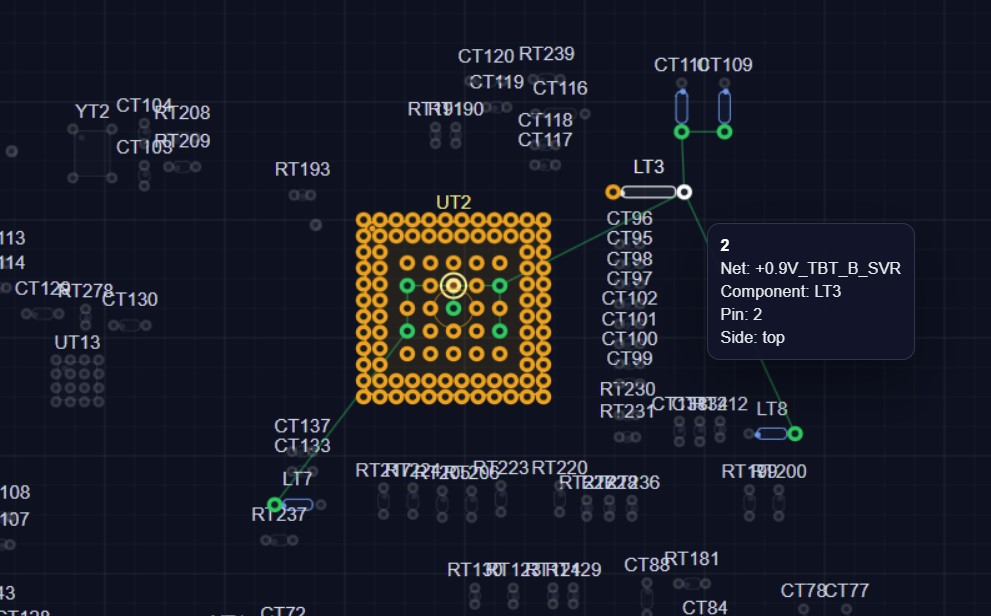
Built for everyday board work: quick search, clear side switching, practical tracing, and a workspace that helps you reach the right area faster.
Jump straight to component names and reach the area you need faster.
Switch sides quickly and keep your orientation while inspecting the board.
Follow logical connections, related parts, and grouped pins in one place.
Inspect pins and related details without losing your current board context.
Pan, zoom, and inspect larger boards with less friction.
Open supported files online without installing a separate desktop tool.
BoardView Trace is a free online boardview viewer created for technicians, repair specialists, and electronics engineers who need a fast way to inspect supported BRD, BDV, and CAD board files in the browser. Instead of switching between heavy desktop tools and multiple windows, you can open the file online, search components, inspect pins, move across the board, and keep the diagnostic workflow in one place.
If you are searching for an online boardview viewer, a BRD viewer, or a practical way to trace PCB components and nets, BoardView Trace is designed around those exact tasks. It helps reduce friction in board-level repair by making top and bottom side inspection clearer, part lookup faster, and net tracing easier during fault isolation.
The service is especially useful for repair workflows where speed matters: locating a component reference, checking orientation, following related pins, or understanding how one area of the board connects to another. Because the viewer runs in the browser, you can access it quickly without installing separate software, which makes it convenient for service centers, independent technicians, trainers, and engineering teams.
BoardView Trace continues to evolve around real workshop needs: faster navigation, wider file support, cleaner inspection tools, and a more efficient way to work with boardview data online. Whether you are opening a boardview file for diagnostics, tracing a signal line, or reviewing component placement, the goal is simple: see the board and trace the logic faster.
Load a supported BRD, BDV, or CAD-family file right in the browser.
Zoom in, switch sides, and center on the exact board area you need.
Find parts, pins, and nets with direct jump-to selection.
Follow the selected connection and review the related components around it.
BoardView Trace is free to use. Optional support through WayForPay helps improve speed, compatibility, and the next practical upgrades for technicians and engineers.
Helps keep the service online and stable for day-to-day use.
Helps make search, zoom, and rendering smoother on larger boards.
Helps bring in more board file formats and practical viewer improvements.
Yes. The product is free to use, and donations are optional.
Each public build shows a clear version number, so you can quickly tell what changed.
Some deployments are open, while others may ask you to sign in before using the viewer.
Yes. The viewer is free to use, and support is optional through the Support us button.